Sell in-store.
Sell online too.

Manage your shop, online store and marketplaces in one app. See your sales, products and stock together.

Online POS is your point of sale (POS): the till you use in your shop. Connect Takealot, Shopify, WooCommerce and Amazon. Choose the stock locations and pack sizes each store uses.

Point of saleOnline storesStock control

Made in South Africa. Built for the world.

STOCK IN ONE PLACE6 stores connected
OOXFLOWSHOP STOCK
48available
Stock is up to date
Shopify
Available48
Up to date
Amazon
Available48
Up to date
Online POS
Available48
Up to date
tTakealot
Available48
Up to date
Online Store
Available48
Up to date
wooWooCommerce
Available48
Up to date
A paid sale at your tillStock updates use your chosen locations and pack sizes.
CONNECTED
Example stock update sample product

CONNECT YOUR SHOP AND ONLINE STORES
Online POSOnline StoreTakealotShopifyWooCommerceAmazon
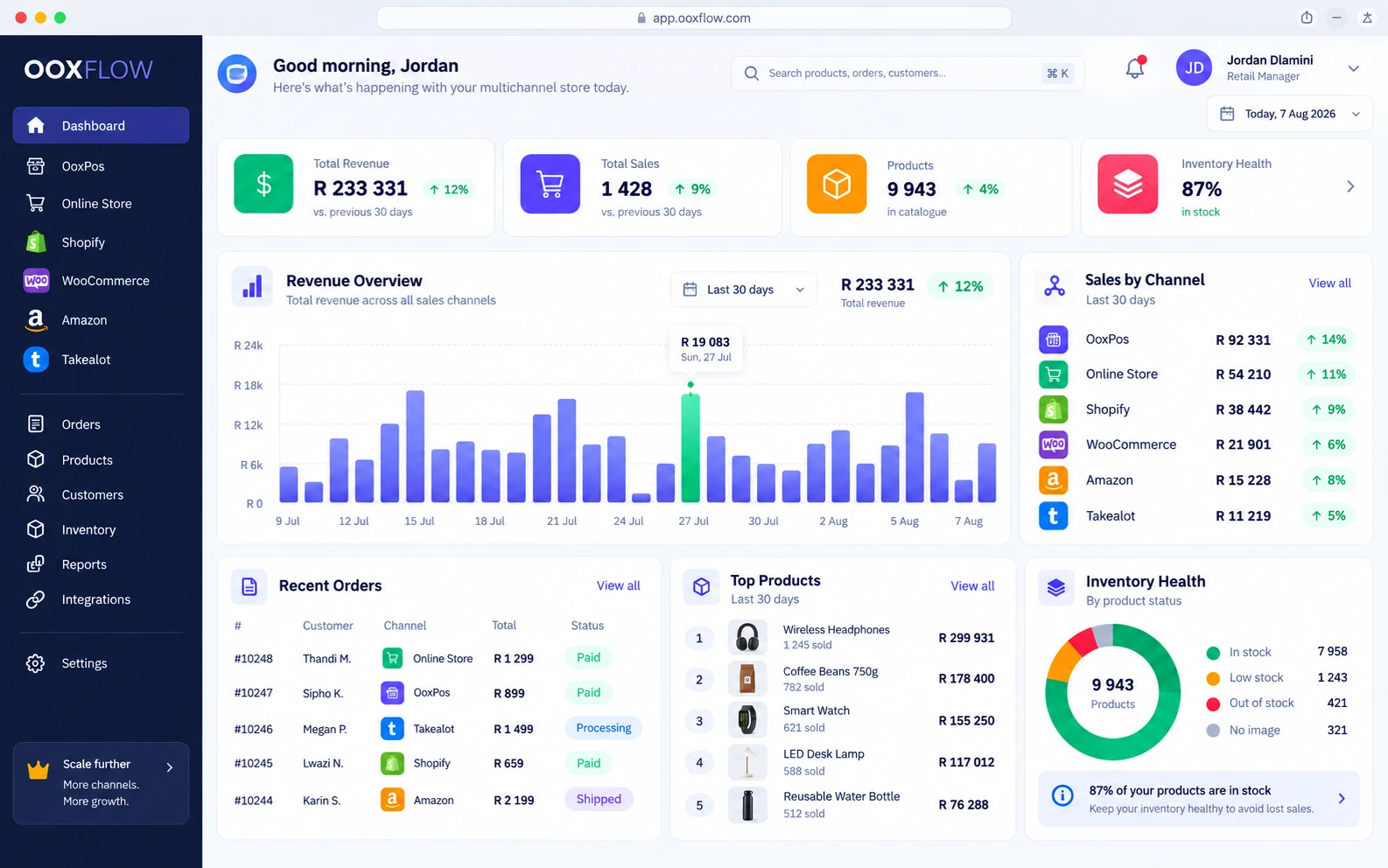
YOUR SHOP AT A GLANCE

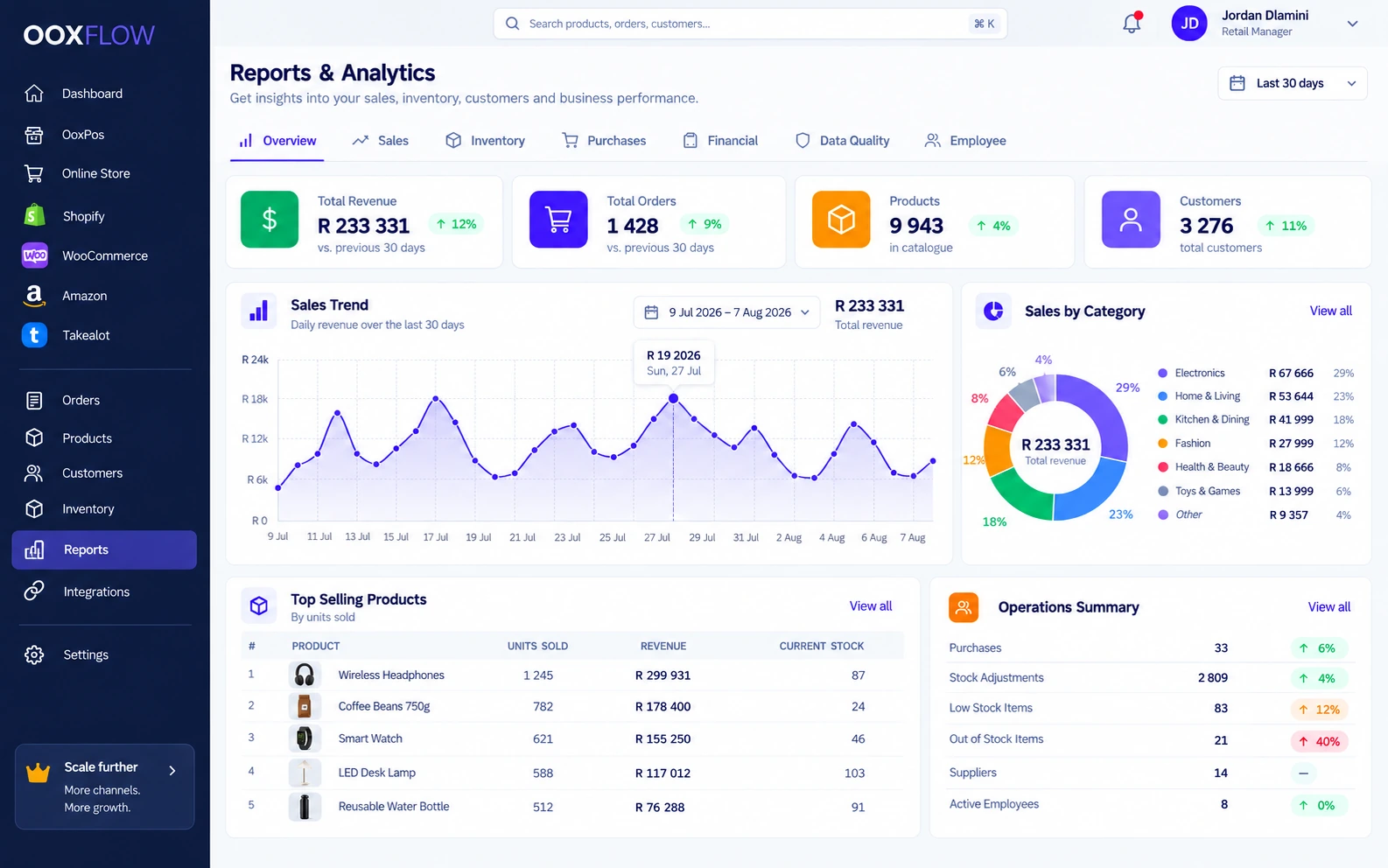
See orders, stock, customers and reports in one place.

OOXFLOW dashboard showing sales, stock, reports and connected stores

Products

Items, variants and prices

Stock

Locations, counts and transfers

Sales

Till, quotes and online orders

Reports

Sales, stock and costs

Works with
ShopifyWooCommerceAmazonPayFastShopifyWooCommerceAmazonPayFast
Your POS tools

Run your shop from your browser

Make sales, check stock, create quotes and read reports at the counter or on your phone.

Sell

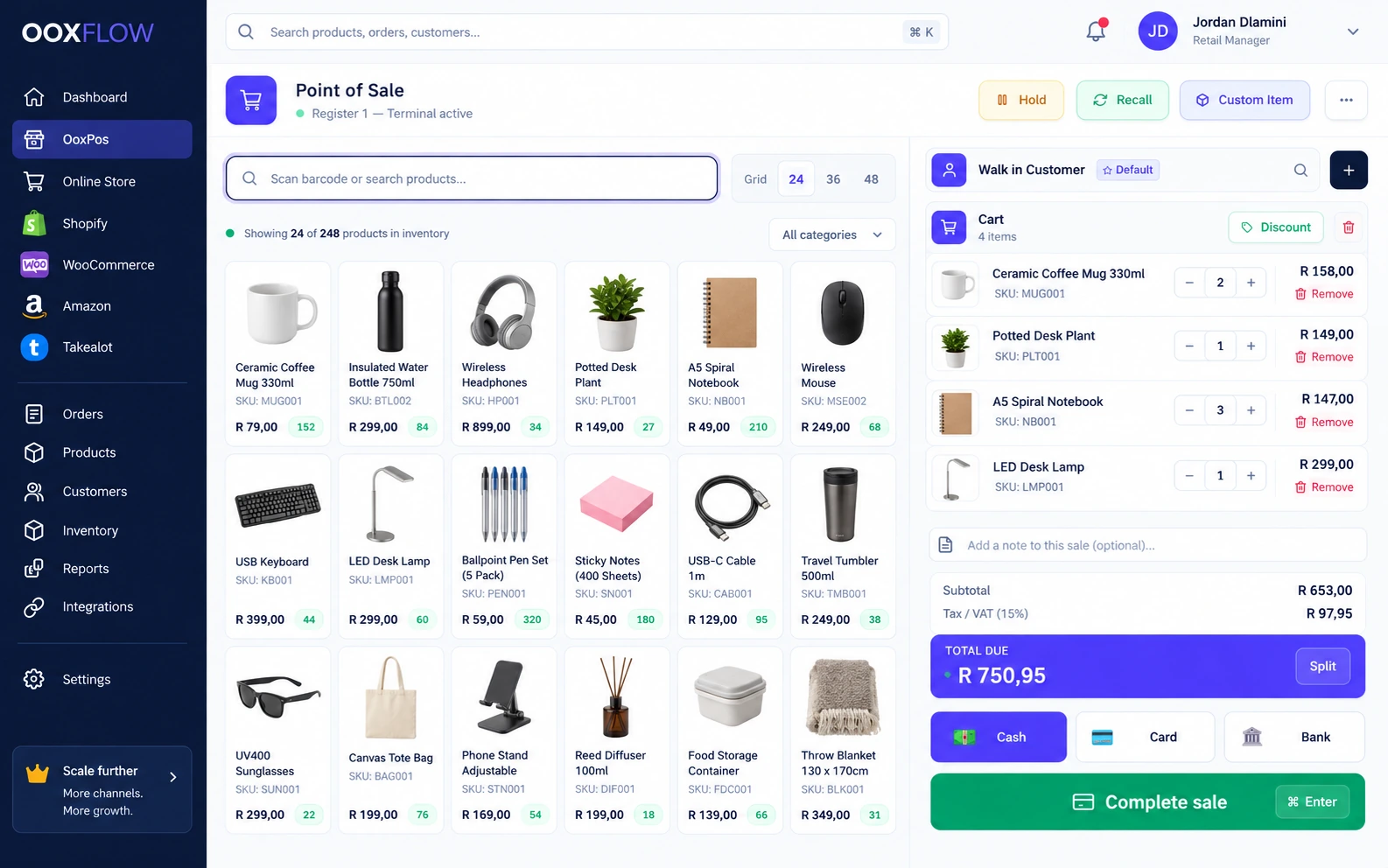
POS till

Scan products, record payment and keep the customer and staff details with the sale.

  • Search, scan or choose from the product grid
  • Cash, card, bank transfer and split payments
  • Save a basket and return to it later
  • Receipts, custom items and customer history
POS till inside OOXFLOW
Check stock

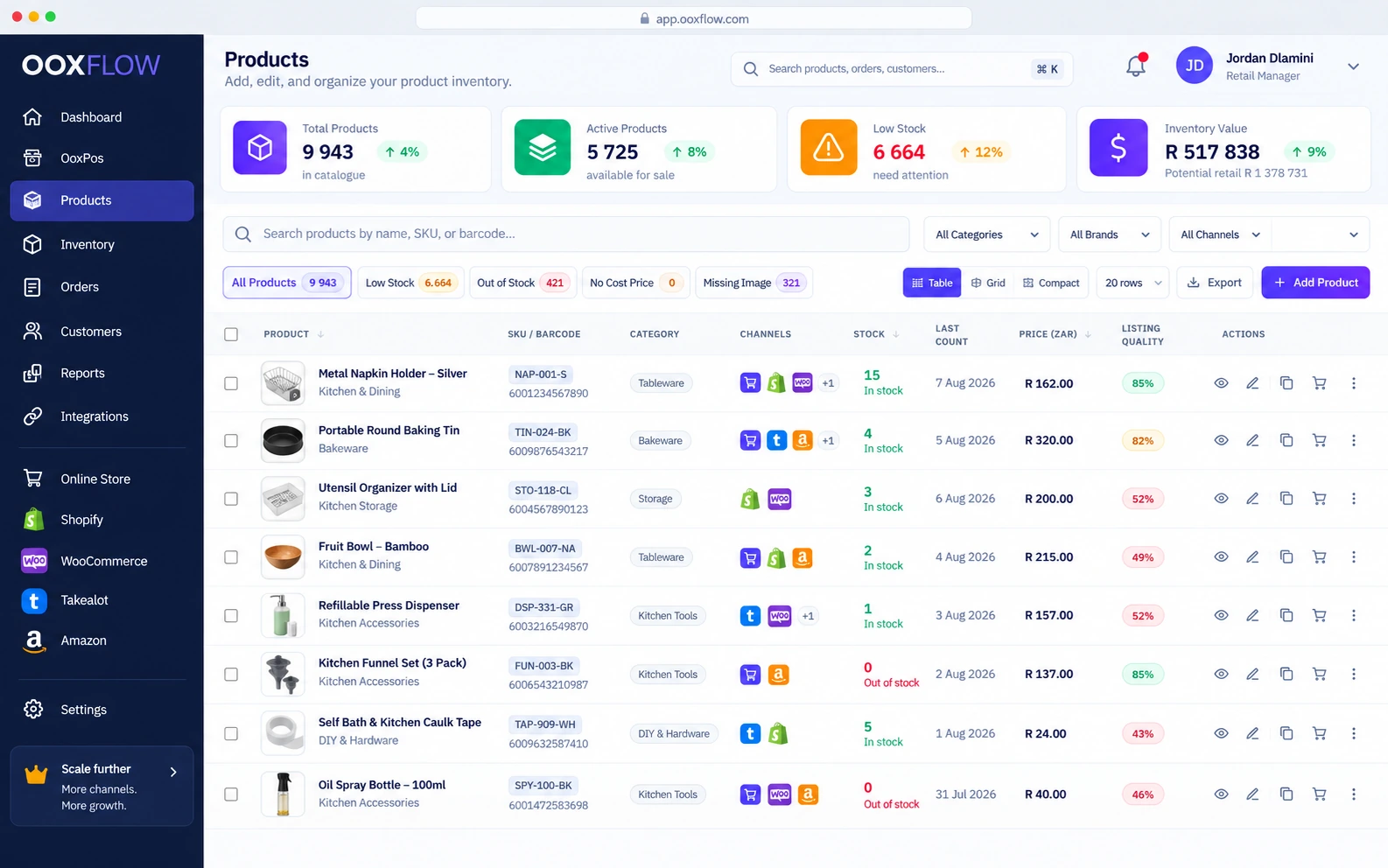
Products & stock

See product details, stock, variants, locations and suppliers together.

  • Import or export Excel and CSV files
  • Products, variants, price groups and barcodes
  • Stock at several locations and stock transfers
  • Find missing details and check action history
Products & stock inside OOXFLOW
Create documents

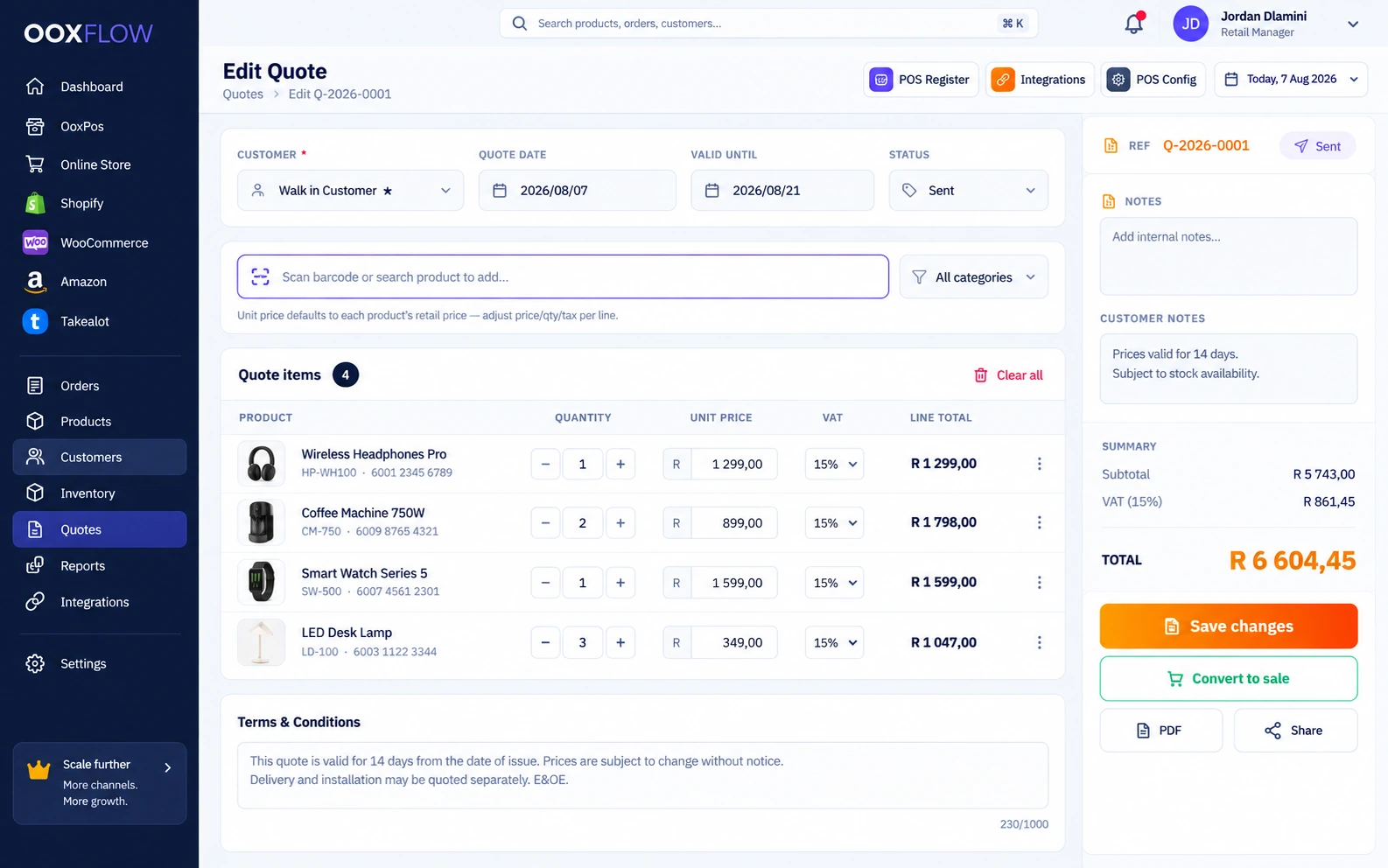
Sales & quotes

Make quotes and invoices with your branding. Turn an accepted quote into a sale without entering each item again.

  • Quotes, pro forma invoices and invoices
  • Share by PDF, email and WhatsApp
  • Turn an accepted quote into a sale
  • Track full payments, part payments and amounts still owed
Sales & quotes inside OOXFLOW
Read reports

Sales & money reports

See your totals, then check each store, product, location or team member.

  • Sales totals, profit and trends
  • Sales by store and product
  • Stock, purchasing and missing-data reports
  • Export reports to Excel or PDF
Sales & money reports inside OOXFLOW
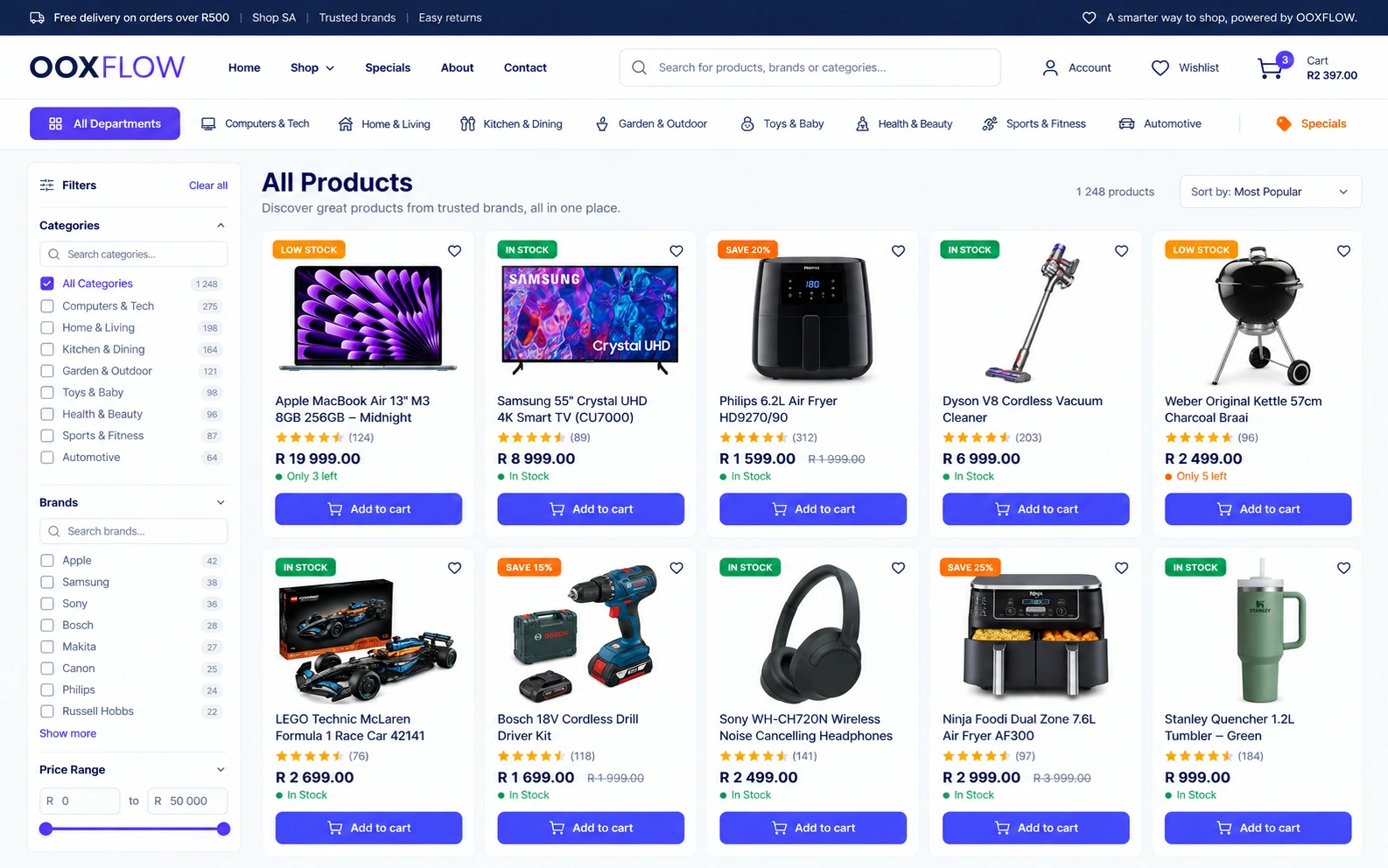
Your own Online Store

Turn your POS products into an online store.

Choose products from your POS, complete their details and put them on your website. Choose which stock locations supply online orders.

  • Your own web address or a supported store address
  • Ready-made themes, your logo and colours
  • Online checkout, delivery and collection
  • Confirmed online payment deducts stock once. Cash-on-delivery orders follow a separate process
  • Customer accounts, tracking, reviews, blog and policy pages
  • Allow approved sellers to sell on your store
  • Build step by step, preview privately, publish when ready and restore a saved design
  • Add marketplace tools for several sellers (add-on)
OOXFLOW online store with product filters, photos, prices, stock and an Add to cart button
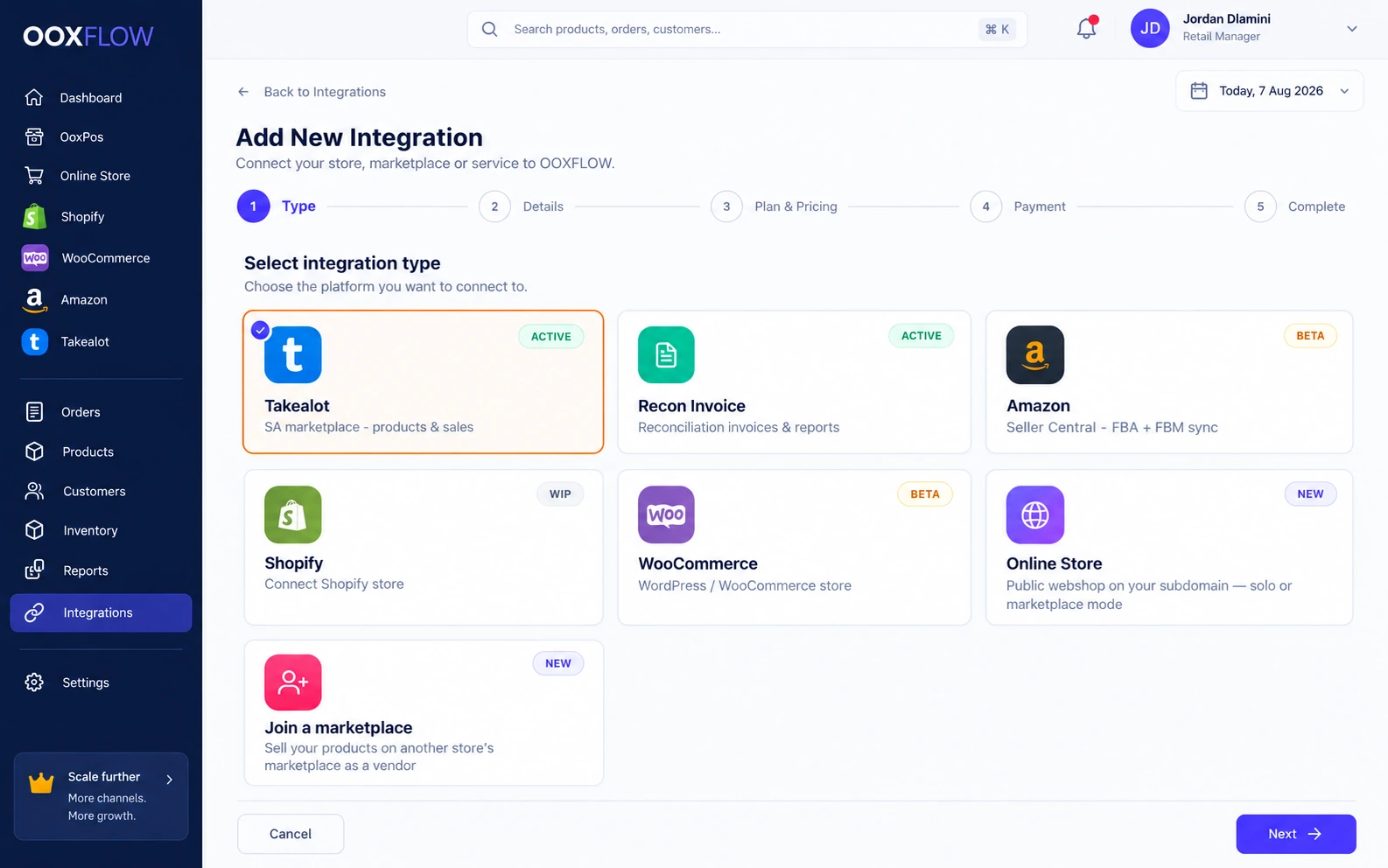
Connect your online stores

Connect Shopify, WooCommerce and Amazon to your till.

Confirmed POS stock changes send updates to connected stores. Product links, selected locations and pack settings decide how much stock each store gets. Imported orders and stock held by Amazon are handled separately.

Shopify

Connected
  • Import and publish supported products
  • View store orders and customers
  • Turn on sold-out hiding and show items again after restocking
  • Choose where each product appears
  • Manage several Shopify stores from one login
  • Send linked POS stock as complete packs
See Shopify tools

WooCommerce

Connected
  • Keep your current WordPress store
  • Import products, variants, customers and orders
  • Send supported stock and selected price updates
  • Follow setup steps. Order messages are checked, and failed messages can be tried again
See WooCommerce tools

Amazon

Connected
  • Supported marketplaces including Amazon.co.za
  • View listings and orders in the dashboard
  • View stock held by Amazon; send your own stock and selected prices
  • Check recorded order costs, estimated fees and final fees
See Amazon tools
Takealot (South Africa) — update offers and stock, with automatic price changes within your limits See Takealot page
Connected Shopify, WooCommerce, Amazon and Online Store accounts with update status
Daily shop tools

Keep track of sales and stock

Stock updates

See what each store can sell

Confirmed sales and approved stock changes update the POS first. Updates for connected stores then run in the background. Check progress, failures and when stock was last counted.

Your stores together

Follow shop and online sales

View till sales, website orders and imported marketplace records. Open each store for details or compare stores in supported reports.

Staff & till cash

See who sold each item

Give staff their own logins, check till cash at closing and approve stock counts.

Everyday tools

Made for your shop

Take cash sales offline

Set up the device on a secure connection first. Cash sales wait on the device and are sent when the internet returns.

Set tax per product

Use prices with or without tax included. Check tax reports for your sales.

Use your shop equipment

Use a USB barcode scanner, phone camera, label printer including 80 mm rolls, and cash drawer. Take card payments on your own card machine.

Import and export data

Preview supported imports before applying them. Download products or reports as CSV, spreadsheets or documents where supported.

For South African businesses Takealot stock and price updatesSet up PayFast, Peach Payments or Bob Pay, or offer cash on deliveryProduct tax and VAT reportsCountry and currency settingsOffline cash sales on a device set up firstHelp by email, chat and connected messaging accounts Takealot page
How to start

Set up your shop step by step

1

Create your account and check your plan

2

Import products from Excel or CSV

3

Set up your website or connect Shopify, WooCommerce or Amazon

4

Sell in your shop, online and on your phone

On your phone — no app needed

Use OOXFLOW in your phone browser

Use the same login and shop records. Make a sale, scan a barcode with the camera or count stock in the storeroom. There is no app to install.

Start free

An app for your customersFor a shopper app with your branding, check available options and the current store-app plan.

Quotes and invoices

Tools for freelancers & service businesses

Send quotes, invoices and pro forma invoices. Add services as items and track what customers still owe. Check your plan for product limits and purchasing tools.

Compare plans

Plumbers & Electricians

Quote a job, send an invoice and check whether the customer has paid.

Developers & Designers

Add your services as products and create invoices with your branding.

Tutors & Consultants

Charge per session, send quotes and keep customer history.

Contractors & Builders

Track material costs and purchase orders, and send customer quotes.

Online chat and AI help

Help shoppers.
Bring your team in when needed.

Turn on website chat in your store colours. Choose how the AI assistant answers product, delivery and order questions. Keep requests for a person easy to find.

Chat while shopping

Turn on the chat box for guests and signed-in shoppers. They can ask a question, make the box smaller and keep browsing.

Answers about your store

Use product details, stock, common questions, policies, opening hours and delivery information. Order details are shared only when the customer has the right access.

Review replies or send automatically

Check suggested answers first, or turn on supported automatic replies for each connected messaging service. AI availability depends on your setup and usage limits. Your store settings still apply.

Get help from your team

Find complaints, checkout problems, bulk-order questions and requests for a call. Keep replies, staff notes and connected messages with the conversation.

For different businesses

Start with your shop.
Add more when needed.

Choose the tools you need now. Add staff, locations and online stores as your business grows.

01

Retail shops

Serve customers at the till, print receipts, check cash and see available stock.

02

Online sellers

Run a website with your branding, linked to the same products, customers and stock as your shop.

03

Marketplace sellers

Manage product links, orders, price rules, fees and stock across seller accounts.

04

Growing businesses

Add staff, set permissions, manage suppliers and locations, and check reports in the same system.

Monthly prices

Choose your plan and store connections

Start with a POS plan. Add the stores and services you need. Each connection or add-on has its own monthly price.

All prices inclusive.

Free

R0/month

Up to 100 products · 2 users in total, including the owner

Recommended POS Pro

R99/month

Unlimited products · 2 users including the owner · extra users R50/month each · basic reports and email support

Online Store

R299/month

Per store · your domain, checkout and delivery

Shopify

R199/month

Per connected store · products, orders and linked POS stock

Some monthly invoice charges start on 1 November. A new purchase may still be charged for the current month. See how billing works.

Common questions

Before you sign up

What is OOXFLOW?

OOXFLOW is a POS and online selling system that runs in your browser. Use it for your till, products, stock, suppliers, quotes, invoices, customers, staff and reports. Connect the same product list to your own website and marketplaces.

Do I need to install anything on my computer?

No. Open OOXFLOW in Chrome, Edge, Safari or Firefox on a computer, tablet or phone. New improvements are available when you load the page again.

Does OOXFLOW store my data online?

Yes. Your data is stored securely online, so you can use the same shop records on different devices. Use the same login on your phone or tablet.

What equipment do I need?

Use a device with a browser and internet connection. You can scan with a USB barcode scanner or phone camera. Add a receipt printer and cash drawer if you need them.

Can I sell in my shop and online at the same time?

Yes. Your POS and Online Store share products and selected stock locations. Confirmed stock changes also send updates to connected stores. Updates may be delayed or fail, so check their status. Offline devices may have older stock figures.

Which online stores can I connect?

Use your own Online Store or connect Takealot, Shopify, WooCommerce and Amazon Seller Central. Supported connections can have several accounts under one login. Check your plan for available connections and charges.

Can staff have their own logins?

Yes. Give each person an account and choose what they can do. Sales, stock changes and counts keep the name of the person who completed them.

Does OOXFLOW have online chat and an AI assistant?

You can turn on a chat box in your Online Store with your branding. The AI assistant uses store information to help shoppers. Review reply drafts or turn on supported automatic replies for each service. Problems, complaints and sales questions can be passed to your team. Connections, AI access and usage limits depend on your setup.

How do I add products I already have?

Import an Excel or CSV file with product names, barcodes, prices, costs, stock, categories and suppliers. You can also export these details.

Does OOXFLOW support South African shops?

Yes. You can use Rand prices and invoices, VAT on sales, supported South African payment and courier services, and Takealot tools.


Run your shop. Sell online too.

Choose a plan. Add your products. Connect the stores you use.